Airtable inventory management: stock across warehouses for Shopify brands
Stock is where a spreadsheet does the most damage, because every mistake turns into an oversell or a dead reorder. Here is how an inventory system built on Airtable is structured for a Shopify brand with several warehouses, how stock moves between them, and when it should run on something else.
Published 14 November 2026. Last updated 14 November 2026.
An Airtable inventory system holds one stock row per variant and per location, fed by purchase orders and transfers, valued at unit cost, and kept aligned with every Shopify store by a two-way sync we set up. It fits brands with a few warehouses and a few thousand variants; past Airtable's record limits, the same model moves to a database you control.
When a spreadsheet stops working for stock
The signs are the same from one brand to the next:
- Stock lives in Shopify, in the 3PL portal and in a sheet, and the three disagree by the end of the week.
- Moving stock between warehouses is a manual adjustment in two places, and goods on the road either disappear or count twice.
- Reorders are decided from memory, because nobody can see stock, incoming purchase orders and sales speed in one view.
- Your accountant asks for the stock value at month end, and producing it takes a day.
- You run several Shopify stores, and each one shows a slightly different picture of the same warehouse.
The data model
The core idea is simple: stock is not a column on a product. It is a row of its own, one per variant and per location, and everything that changes stock writes to those rows.
| Table | One record is | What it holds |
|---|---|---|
| Variants | A sellable SKU, or a component | SKU, barcode, unit cost, reorder settings |
| Locations | A place stock can sit | 3PLs, a retail store, transit locations, which Shopify location it maps to |
| Stock levels | One variant in one location | On hand, incoming, reorder point, value, health |
| Purchase orders | An order to one supplier | Supplier, destination, dates, lines, quantity received |
| Transfers | One move between two locations | From, to, transit, status, lines |
| Suppliers | A supplier | Lead time, minimum order, currency |
Two design rules carry most of the weight. Locations are records, not columns, so adding a warehouse is one new row rather than a new field on every product. And nothing edits a stock level by hand except a counted adjustment with a reason: stock changes because a purchase order was received, a transfer moved, or Shopify sold it.
Stock levels across warehouses and stores
The stock table is the view people open every morning. Each row answers one question: how many of this variant are in this place, how many are on their way, and is it time to reorder.
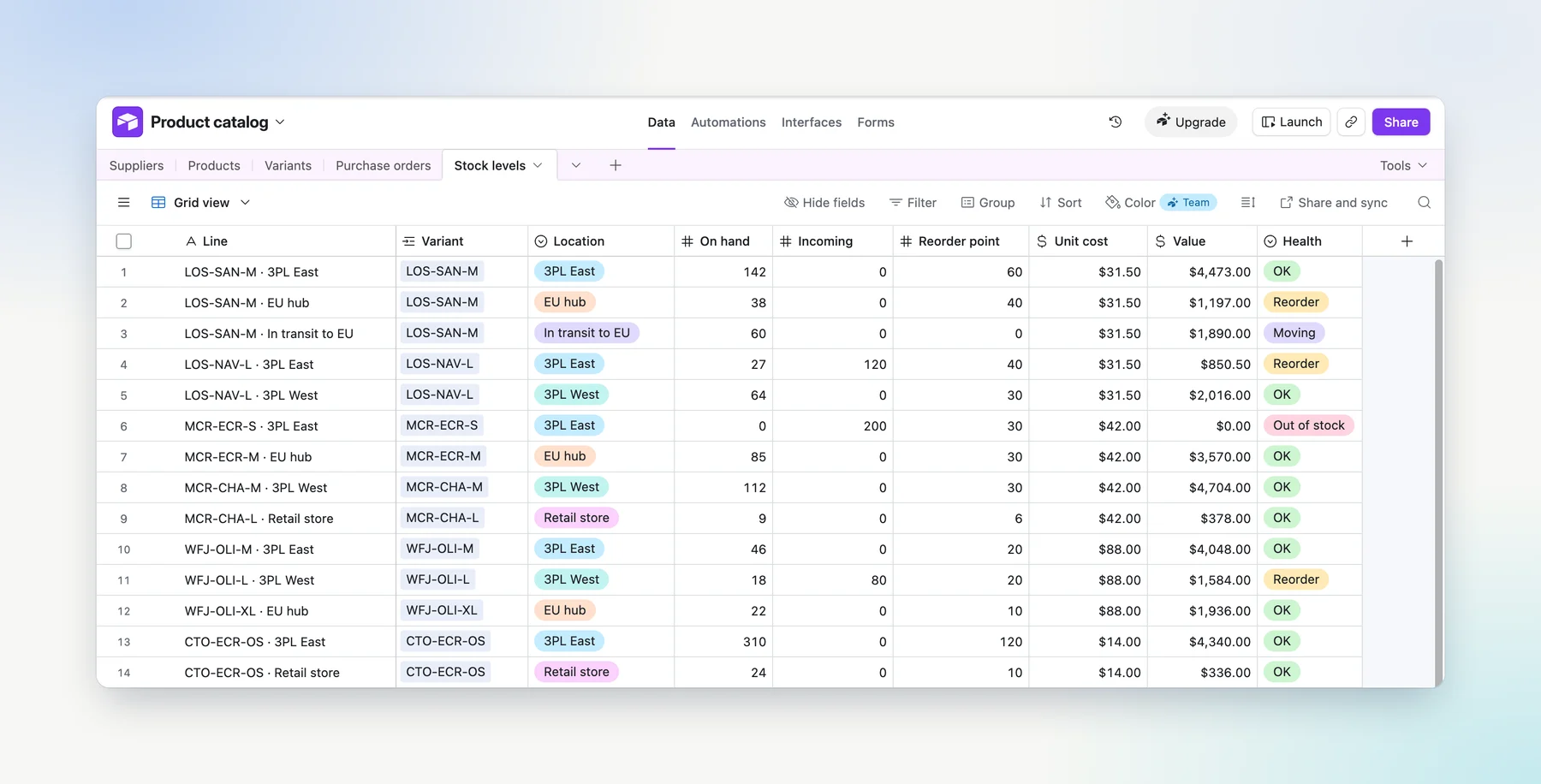
For a brand on several Shopify stores, this is where the drift stops. Stock is held once, per physical location, and mapped to the matching location in each store. Shopify keeps doing what it does well, decrementing stock on every order, and the sync brings those levels back so the table always shows what is really on the shelf.
Moving stock between warehouses
Transfers are where most systems, and most spreadsheets, quietly break. Goods leave one warehouse days before they arrive at the next, and in between they have to be somewhere. The answer is a transit location: the transfer happens in two steps, and each step is a pair of stock level updates.
A transfer is a header (from, to, transit, status) and lines (SKU, quantity). Changing the status runs the move, after checking that the origin has the stock. A transfer within the same region can skip transit and move in one step. Because the system writes stock levels rather than replaying a history of movements, a transfer entered late does not corrupt the ones that followed it.
Purchase orders
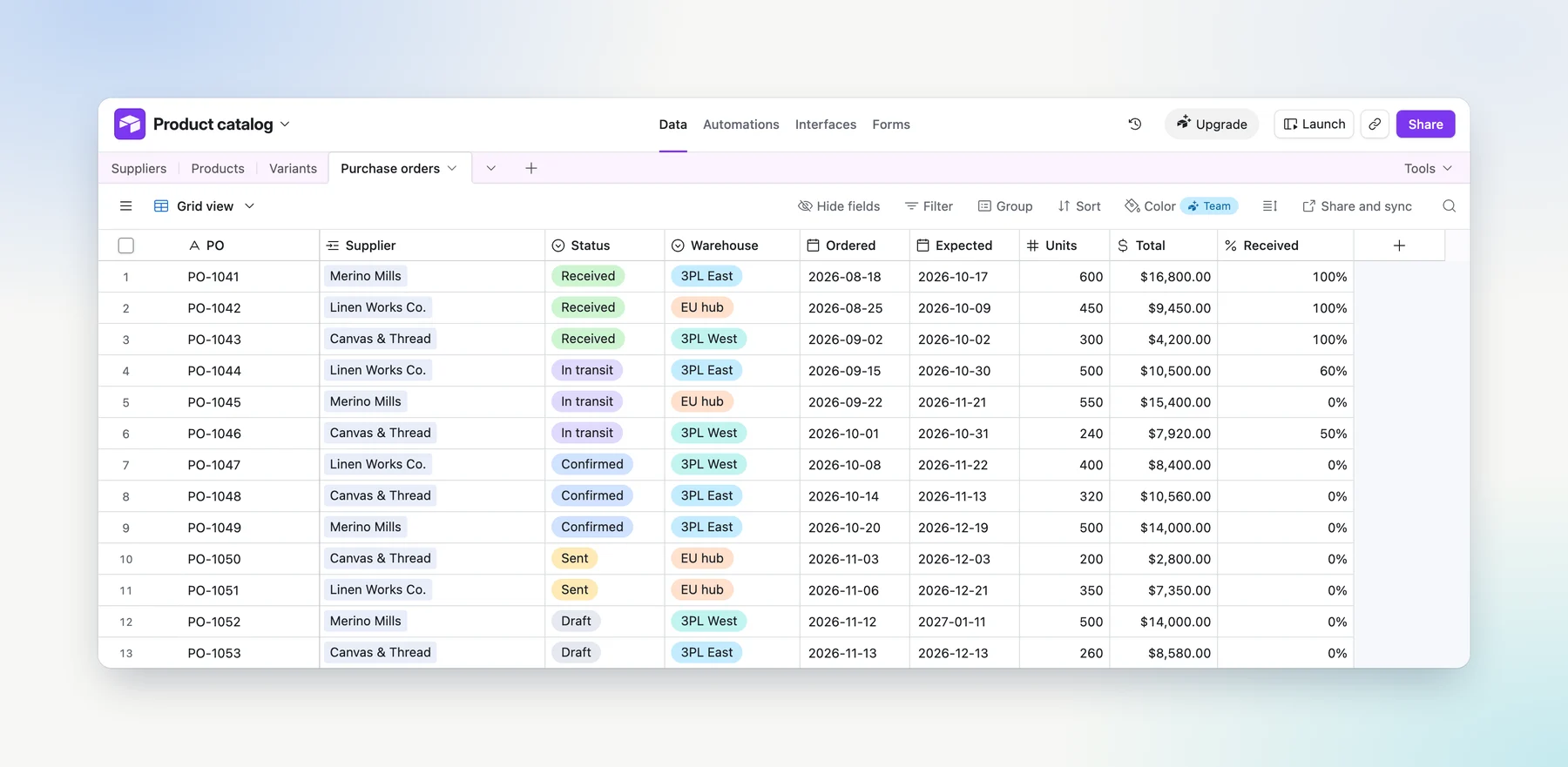
Purchase orders close the loop. Each order carries its supplier, the warehouse it is going to, the order and expected dates, and its lines. Open orders feed the incoming column of the stock table, so a reorder decision sees what is already on its way. Receiving an order, fully or in part, adds the quantities to the destination warehouse.
A worked example
A direct to consumer fragrance brand sells across the UK and the EU, from eleven stock locations: third party warehouses, a boutique and transit locations between the two markets. Before the system, stock, costs and production lived in a stack of spreadsheets.
- Components are SKUs. Bottles, caps, sprays, labels, boxes and the fragrance itself are tracked like any product, with stock per location and a unit cost. A bill of materials of close to 1,300 lines links each finished product to what it consumes.
- Stock is valued in two currencies. The value of every SKU in every location is computed in pounds and in euros, from a single exchange rate the team sets. About half a million units are valued this way, with no export.
- Transfers go through transit. Stock moves between warehouses from the base, in two steps through transit locations. Transfers entered out of order in Shopify had corrupted the brand's counts before; writing levels instead removed the problem.
- Costs tie out. The cost of each of the 88 finished products, computed from its bill of materials, matched the brand's own costing file to the cent.
The same model reads component needs before a production run, which is where purchasing starts. The point is not any single feature. It is that stock, components and costs finally live in one place, connected to Shopify, and the team can open it.
Airtable or an inventory app
| Spreadsheet | Inventory app (Zoho Inventory, Cin7, Katana) | System built on Airtable | |
|---|---|---|---|
| Stock per location | One tab per warehouse, by hand | Built in, in the vendor's model | One row per variant and location |
| Transfers | Two manual adjustments | Built in | Two steps through transit, your rules |
| Components and BOM | Separate sheet, rarely current | Depends on the product and the plan | Components are SKUs, linked to finished goods |
| Valuation | A day of work at month end | Built in, in its costing method | Live, per location, in the currencies you need |
| Several Shopify stores | Drifts within weeks | Depends on the connector | Synced both ways, through a sync we set up |
| Product data and costs | Other files | Usually another tool | Same base, linked |
| Who changes it | Anyone, which is the problem | The vendor's roadmap | Your team, or any Airtable builder |
The rule of thumb: if your process fits an inventory app's model, buy the app. If every demo ends with an explanation of why your case is different, components, transit, several stores, two currencies, a system built around it will be used, and the app will be worked around.
Limits: when it should run on something else
Stock is the block that spends records fastest, because rows multiply variants by locations and every movement adds lines. Airtable caps records per base: 50,000 on Team and 125,000 on Business, with higher limits set by contract on Enterprise Scale (Airtable's plan documentation, checked in November 2026).
As an order of magnitude, 3,000 variants across 5 locations is 15,000 stock rows. A year of purchase order and transfer lines can add as many again, which is why closed movements are archived out of the base on a schedule. Past that, or when order volume needs stock to update faster than Airtable's API allows, the same model moves to a database you control, with an application on top and the same sync to the stores.
And one thing does not move: Shopify remains where sales happen and where each order takes its units out of stock. The inventory system is the layer around it, not a replacement for it.
How we approach it
Propicca builds these systems for ecommerce brands scaling from $1M to $10M. Inventory is often the second block, after product data on Airtable, because stock reads from a clean catalog. We start with a free audit call, write the scope and the price down, build the block that hurts most, then grow it. If you are weighing this against a full ERP, we compared the two in Airtable vs ERP.
Questions we get asked
- Can Airtable be used for inventory management?
- Yes, for the operational side of it: stock per variant and per location, transfers between warehouses, purchase orders, reorder points and stock value. Airtable holds that as linked records your team can open and filter. Sales still happen in Shopify, which keeps decrementing stock on every order; the system reads those levels back and adds what Shopify does not model the way you work.
- Does Airtable update Shopify stock automatically?
- Not on its own. Airtable has no two-way Shopify sync built in. We set up a sync between the stock table and the matching Shopify locations, so a level changed in the system reaches Shopify, and a level changed by an order in Shopify comes back to the system.
- How do you track inventory across several Shopify stores?
- With one stock row per variant and per physical location, held once in the system and mapped to the matching location in each store. The number a store shows comes from that row, so the stores stop drifting apart. Transfers and purchase orders write to those rows, never to a store directly.
- How many SKUs and locations can an Airtable inventory system handle?
- Stock rows grow with variants times locations. 3,000 variants across 5 locations is 15,000 rows, before transfer and purchase order lines. That fits the 125,000 records of the Business plan with room to spare, provided old movement lines are archived. Past that, the same model moves to a database you control.
- Can it handle components and bills of materials?
- Yes. Components are SKUs in their own right, with stock per location and a unit cost, and a bill of materials links each finished product to the components it consumes. That is what lets the system value stock correctly and show what a production run will need.
- Airtable or an inventory app like Zoho Inventory, Cin7 or Katana?
- An inventory app is the faster start when your process matches its model and you do not need to change it. A system built on Airtable fits when your stock logic is specific: components, transit locations, several stores, valuation in two currencies, reorder rules nobody else uses. It is shaped around how you work, and it connects to product data and costs in the same base.
- Can Airtable create purchase orders?
- Yes. A purchase order is a header with its supplier, warehouse and dates, and lines with SKUs and quantities. Received quantities update stock, the expected date feeds incoming stock, and the order can be turned into a PDF for the supplier from the same record.